Why did the line disappear when its visible size stayed the same?
A small browser experiment grew out of bound.less: compare thin SVG paths that should look alike, then see where the browser paints them differently.
The problem inside bound.less
In an infinite-zoom drawing app, a stroke may be stored at a very small local scale and enlarged for display. Its on-screen width should still look right. During the bound.less work, thin SVG paths could disappear even when a compensating transform was meant to preserve their visible size.
I separated that behavior from the full application so it could be compared in a small, shareable page.
What the experiment changes
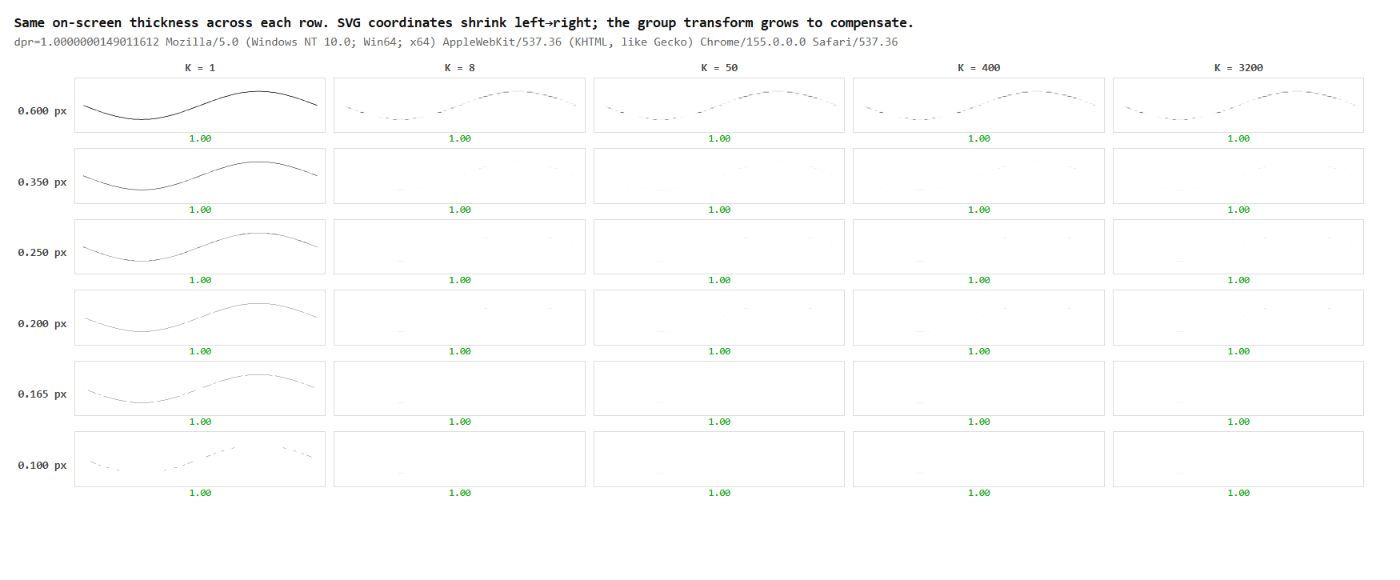
The grids draw comparable paths at different local coordinate scales and target widths. The transforms compensate for scale so the intended on-screen dimensions remain comparable. A canvas version acts as a negative control: it helps test whether measuring canvas pixels tells the same story as looking at live SVG.
What to look for
Open the live SVG grid, compare its rows, then open the canvas control. Look for a path that is absent or weaker in one view. The interesting result is disagreement between things that were expected to paint alike.
The original investigation saw paths disappear at about 0.165 CSS pixels in the Chrome setup it tested. That’s an observation, not a universal threshold: browser version, zoom and screen density all affect it.
What the lab contributed
I used AI-assisted debugging to turn a difficult application symptom into controlled comparisons. The lesson is practical: a canvas pixel count can miss a failure in live SVG painting. Inspecting the actual browser output matters when choosing a rendering strategy. This was one of the reasons bound.less now draws with its own rasterizer, which works out exactly how much of each pixel a line covers. A 0.165-pixel line then shows as a faint grey line instead of vanishing.
This is a rendering investigation, not an image-quality benchmark across browsers.